
How to Register a Domain Name: Step-by-Step Guide
Every great website, app, or product starts with a name. And in the digital world, that name is represented by your domain. Whether you’re launching a passion project, setting up shop online, or building the next big thing, this guide walks you through how to register your domain without the confusion, the tech jargon, or the stress.
Step 1: Pick a Domain Name That Works
This is where most people get stuck. Your domain name should be a short, clear, and easy-to-remember name that your visitors and customers can find you with.
Some quick tips:
- Keep it simple and pronounceable
- Avoid numbers, hyphens, or weird spellings
- If you’re targeting a specific local market, go for a relevant country-specific domain – like
.com.ng.co.ukor.us.
Building something for local users? Choosing a country-specific extension (TLD) shows you’re focused on your local market.
Step 2: Check If It’s Available
Once you have a name in mind, go to Gbefunwa and type it into the domain search bar. You’ll know right away if it’s available or not.
If it’s already gone (it happens), don’t stress. You have options:
- Add a short word before or after it, like “get”, “app”, or “use”. For instance, if
example.comis taken, trygetexample.comorexampleapp.com - Try a different extension (TLD):
.africa .dev .coetc. - Use an abbreviation or synonym that still makes sense
This step requires some creativity, but it is worthwhile. You will know when it feels right.
Step 3: Register Your Domain Name
Found the perfect name? Time to lock in.
Here’s how the process looks on Gbefunwa:
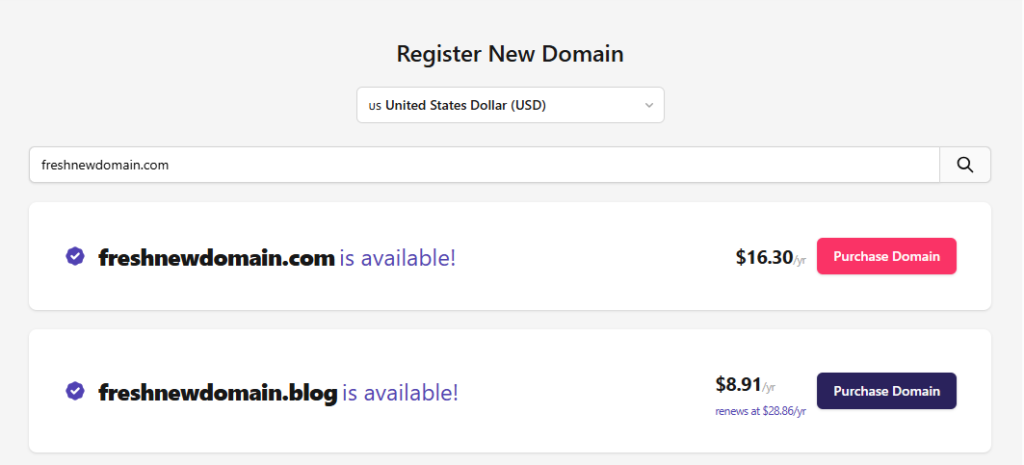
- Sign in or create an account
- Search for a domain name
- Add it to your cart
- Checkout securely (yes, we support local payments too)
No foreign exchange stress, no extra hoops. You pay in USD or Naira, and you’re done in a few minutes.
Step 4: Connect It to Your Hosting
Now that you own the domain, you’ll want to point it somewhere; your hosting platform, staging environment, or wherever your code lives.
You can:
- Use Gbefunwa’s DNS (super easy, especially if you’re hosting with us)
- Or connect it to another platform, like Vercel, Netlify, or DigitalOcean, by updating your DNS records
We give you full access to DNS settings: A records, CNAMEs, TXT records you name it. So no limits if you like to tinker.
Step 5: Set Up SSL & Privacy
Let’s talk security and spam prevention.
First: SSL. You need HTTPS, no questions asked. Whether it’s a blog, portfolio, or app, users expect it, and so does Google. Gbefunwa includes free SSL in all hosting plans, or you can install Let’s Encrypt manually.
Second: WHOIS Privacy. This hides your info (name, phone number, email) from the public internet. Do not turn this on unless you want spam calls from random registrars.
With Gbefunwa, your contact information is private and protected from spam and identity theft.
Step 6: Keep It Yours
Once your domain is live, don’t forget to keep it that way. Domains expire every year unless you renew them, and if you miss that renewal… well, someone else could scoop it up.
Gbefunwa gives you a few ways to avoid that:
- Enable auto-renew
- Get renewal reminders
- Easily transfer in domains from other providers (if you’re tired of using multiple dashboards)
At Gbefunwa, we provide Domain Lock that prevents unauthorized transfers and maintains full control over your registered domains.
Final Thoughts
A good domain sets the tone for everything that follows. With Gbefunwa, you get speed, simplicity, and support so you can focus on building.
Get Your Perfect Domain!